
JavaScript widget boundaries
Decide what a widget may reach before deciding which JavaScript it may run.
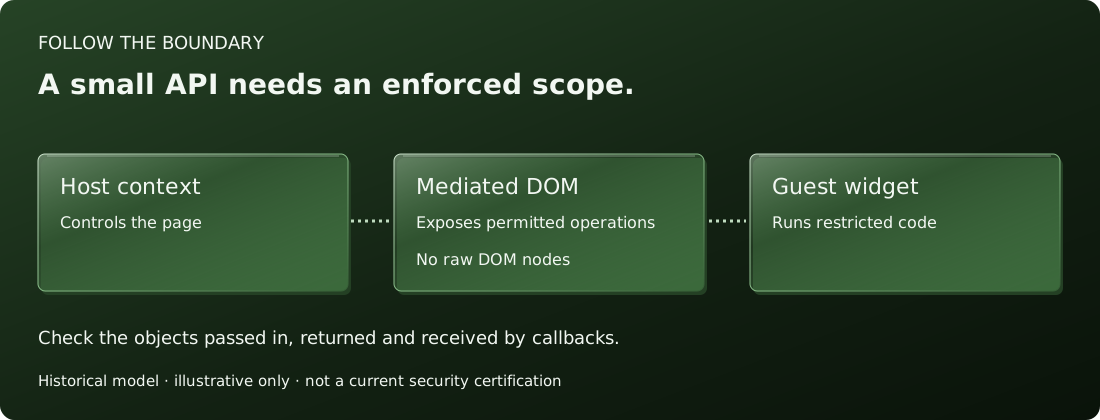
Can it read the host page? Can it change another widget? ADsafe approached those questions by restricting guest code and mediating its access to the document. Understanding those two parts helps distinguish a small API from an enforced boundary.
A restricted interface needs restricted code
Giving a callback an object with a few methods makes an API convenient. It does not, by itself, prevent the callback from using other objects available in its environment. Ordinary page scripts can refer to browser globals such as window and document.
ADsafe paired a restricted subset of JavaScript with a runtime. Its historical workflow used JSLint to check guest code. Restrictions on globals, dynamic evaluation and certain property accesses were part of that language design. The runtime then provided a controlled interface to permitted page elements.
The returned objects matter
A method can look narrow while returning an object with broad authority. A raw DOM node provides relationships to its owner document and surrounding tree. ADsafe's wrapper interface was intended to let widgets select and change elements without exposing those raw nodes.
When reading a widget interface, follow the values in both directions. What does the host pass in? What does each method return? What reaches an event callback? These questions apply to the whole interface, including approved helper libraries.
Browser frames provide a different boundary
For a current browser application, a sandboxed iframe is another mechanism to examine. The browser applies restrictions to a separate browsing context. The iframe's sandbox attribute starts with restrictions; tokens selectively restore capabilities.
<iframe
  src="https://widgets.example/widget"
  title="Third-party widget"
  sandbox="allow-scripts">
</iframe>
This is an illustrative configuration, not a complete integration. The allow-scripts token permits script execution while other sandbox restrictions remain. The content URL, permissions and communication design still need to match the application's requirements.
The HTML standard warns against combining allow-scripts and allow-same-origin when the embedded page has the same origin as its parent: that combination can let the embedded page remove the sandbox and reload. Copying a permissive token list from an example can therefore change the boundary you intended.
Make the trust decision explicit
Write down the widget's required capabilities, the objects it receives, and the mechanism that enforces restrictions. Test the permitted operations and attempts to reach outside them. Keep historical examples separate from claims about a current implementation.
ADsafe remains useful as a way to study these questions. Its archived design is not evidence that a new deployment using an old runtime has been reviewed. Start with the widget model, then inspect the document interface and the exact source version under discussion.