
Sandboxed iframes compared with the ADsafe approach
A sandboxed iframe and an ADsafe widget both try to limit what third-party code can do, but they enforce the limit in different places. This guide compares the two designs and keeps the historical facts apart from current advice.
Two places to draw the line
A boundary can be drawn around a place or around a language. The iframe sandbox attribute draws it around a place: the embedded document runs in its own browsing context, and the browser withholds capabilities from that context. ADsafe drew it around a language: guest code stayed in the host page, but it had to be written in a verified subset of JavaScript and could only reach the page through objects supplied by the host.
Neither design removes the need to decide what the guest should be able to do. They only change who enforces the decision, the browser or a checker plus a runtime library.
What the sandbox attribute does
According to MDN, an empty sandbox value applies all restrictions, and space-separated tokens lift individual restrictions. Without allow-same-origin, the embedded resource is treated as coming from a special origin that fails the same-origin policy, which can block access to cookies, storage and some APIs. Without allow-scripts, scripts do not run. Without allow-popups, window.open() and target="_blank" silently fail.
<iframe
  src="https://widgets.example/ad"
  title="Third-party widget"
  sandbox="allow-scripts"></iframe>
Here the widget may run script, but it has an opaque origin and cannot navigate the top page or submit forms. The guest can still run arbitrary JavaScript inside its own frame, call eval there, and send messages to its parent with postMessage. The host decides how to treat those messages.
Two cautions come from the MDN and WHATWG documentation. First, combining allow-scripts and allow-same-origin on a same-origin embedded document lets that document remove its own sandbox attribute, so the result is no safer than no sandbox. Second, popups and redirects opened from a sandboxed frame inherit its restrictions unless allow-popups-to-escape-sandbox is set.
What ADsafe did instead
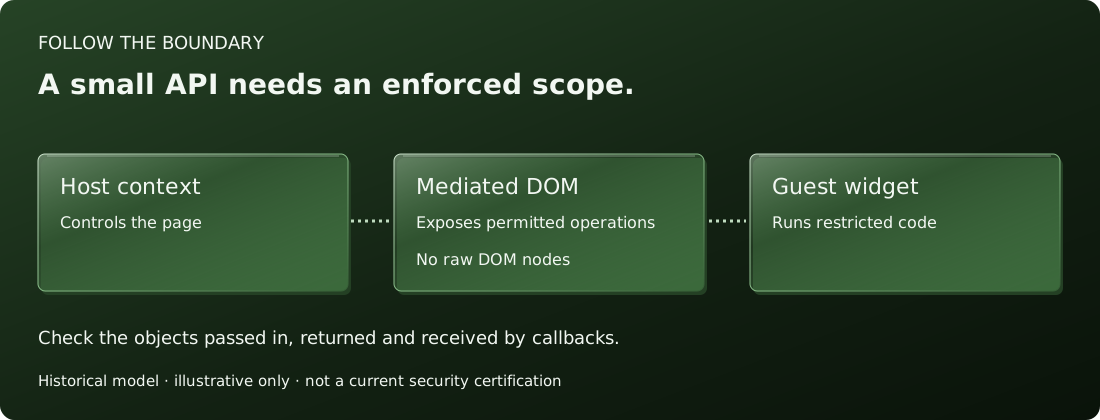
The ADsafe source and its archived pages describe a widget as an HTML fragment wrapped in a div with an uppercase id ending in an underscore. The fragment calls ADSAFE.go with a callback, and the callback receives a dom object that covers only that div's subtree. The documentation states that it is not possible to get from there back to the document root.
The language side was handled by a static check. The project's pages say the widget is verified with JSLint using the adsafe option, which rejects constructs such as eval, this, most global names and unsafe property names. The runtime side, adsafe.js, supplies the wrapped DOM and refuses banned property names when guest code calls ADSAFE.get and ADSAFE.set.
The widget therefore shares the page's document and JavaScript realm. Its isolation depends on the checker having rejected every route to window and document before the code ran.
Comparing the two designs
- Enforcement point. The browser enforces the iframe sandbox. In ADsafe, a verifier and a runtime library enforce the subset, and the page trusts that verification happened.
- Guest language. A sandboxed frame accepts ordinary JavaScript. ADsafe accepts only the subset, so existing scripts usually need rewriting.
- Layout and integration. A frame is a separate rectangle with its own document. An ADsafe widget lives in the host page and can be styled and queried through the mediated interface, which suits small in-page features.
- Failure mode. If the iframe attributes are too permissive, the guest gets more capabilities. If an ADsafe checker or wrapper misses a leak, the guest can obtain page-level objects.
- Communication. A frame uses messages. ADsafe uses methods the host places on the
domandlibobjects, and the page may add more throughADSAFE._intercept.
Choosing today
For a new embed, the browser-enforced frame is generally the place to begin: list the capabilities the widget needs, add only the tokens that grant them, serve it from a separate origin, and validate incoming messages. A language-subset design is worth studying for the questions it raises about leaked references, but it asks the host to trust a verifier and a runtime that must keep up with browser changes.
ADsafe is a historic project. This site is an independent reference, is not the official ADsafe site, and is not endorsed by the author of ADsafe. It does not offer ADsafe as a currently reviewed security boundary. The comparison above describes design ideas, not a security review of any code. See also Content Security Policy for third-party scripts and the widget structure page.
Primary sources
Related guides
Independent educational explanation. Read alongside the cited sources; this page does not certify the historical runtime as a current security boundary.